

Typing Point English 1.5
English Typing Master is a free, lightweight typing tutor for Windows by Typing Point, offering level-based lessons, progress tracking, speed and accuracy tests, and simple games to help beginners improve their typing. It's portable (6.9 MB), works offline on Windows 7–11, and includes quirky features like a heart rate meter in every exercise. It's not as advanced as the paid TypingMaster 12, which offers dark mode, custom layouts, multilingual support, and advanced analytics, but for a free tool with no ads or subscriptions, it does the job. Best suited for beginners and casual users who want to stop looking at their keyboard without paying for a premium typing course.
- Free
- Windows
- Nov 9, 2026
4d2da2abc00bc3afb9163ee815225ccea07076bb61ec544233fce92501970829VirusTotal report ↗Screenshots
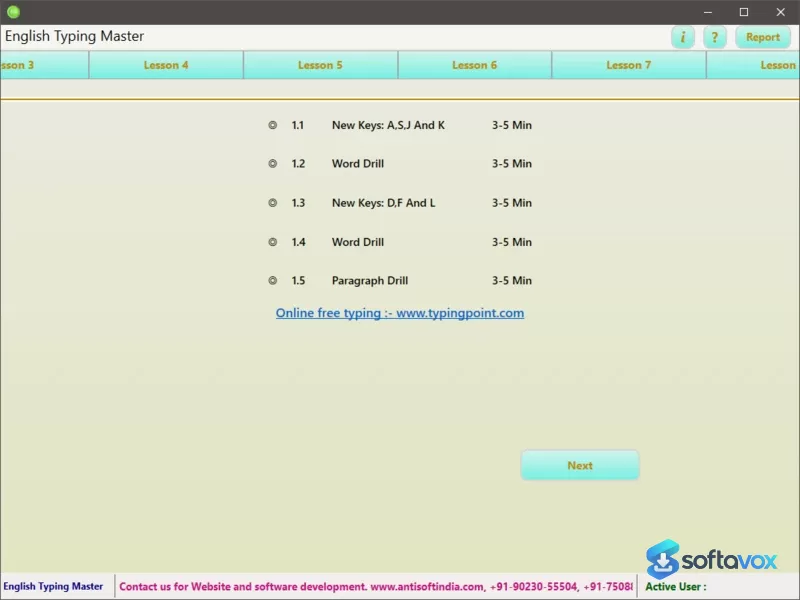
About Typing Point English
Look, let me tell you something straight up, ok? I'm not a typing prodigy who practices on mechanical keyboards since high school. I type with six fingers, I always look down, and my backspace key does all the work for me. Which is why I can confidently say that English Typing Master is really easy to use
as a person who really struggles with typing
English Typing Master is a free Windows typing tutor from Typing Point (sometimes attributed to Antisoftindia) that has been around for a while now and is known for being very straight to the point and simple. It is a simple program designed to teach correct typing techniques to improve speed and accuracy, and let me tell you, that's all I needed.
Typing Lessons Made Easy
Lesson, exercises, and tests galore are all included in this one simple typing tutor, which helps you learn all the basics and more advanced shortcuts to be more proficient at typing with your keyboard. Nothing fancy, just basic and straightforward.
Lessons start off easy and get progressively harder the more you practice. This helps you to improve your skills in a step-by-step manner
This can help beginner typists since you won't be thrown into the deep end by being forced to type long essays right away
The program also tracks your progress and adjusts the lessons to your needs to help you improve your proficiency. It can also help you monitor your speed and accuracy, which can be really motivating since you can see how much you've improved. Heart rate and stopwatch features are also included in every lesson, which is an interesting feature because I've never seen that anywhere else. Not that it's bad or anything, but I'm honestly curious as to what purpose it serves.
Games for Fun
If you want to have some fun while improving your typing, there are also games and quizzes included that are related to typing that can be a nice change of pace from regular lessons and help you practice in a fun way.
The games are nothing special compared to some other typing tutors like TypingMaster 12, which has some really cool games like Cloud Race and Pipe Master that are actually pretty fun to play, but they get the job done.
Wait, What's This? Another TypingMaster?
Hold on, isn't there also another typing tutor called "TypingMaster?" Yes, there is, actually. There is an entire other typing tutor software called "TypingMaster" made by Cloud Kayak Labs Oy that has been around since the 90s that has much more features than English Typing Master
While both softwares have similar names and are similar in purpose, they are essentially completely different softwares with different interfaces, features, and more. English Typing Master is a simpler, free alternative to the much more feature-rich and premium TypingMaster 12 that is designed for professionals. If you want the premium experience with dark mode, Hindi Inscript support, advanced analytics, and the Satellite widget that tracks your progress even when you're not on the software, then you need TypingMaster 12. If you want a simple, straightforward way to practice typing for free with minimal fuss, then English Typing Master is right up your alley.
Why is this Better than other Typing Tutors?
In comparison to other typing tutors, English Typing Master is much better for casual typists and students because it is much more individualized and adaptive to each typist's progress than others like TypingClub, while also being much simpler than keybr.com, which has a very minimal interface that utilizes random text generation that can be frustrating to use.
If you want individualized lessons suited to your progress to help you become a faster and more accurate typist, English Typing Master is the right choice for you. However, if you want the best typing tutor available in 2026, it would be TypingMaster 12, which is ranked #1 typing tutor by independent reviews with a 9.4/10 rating. While English Typing Master is free for casual use, TypingMaster 12 requires a one-time payment of roughly $29.90 for the Premium Lifetime license, but is worth the price if you want the best experience. English Typing Master is only the beginning for anyone serious about learning to type.
Simplicity
English Typing Master is very simple to use and straightforward, making it accessible to a wider audience. You can also practice your typing and see your progress right away with helpful features that let you know how you did. Its small size (about 6.9 MB) and ability to work on Windows 7-11 without the need for an internet connection makes it very convenient since it can be used anywhere and is simple to set up. It is very portable, free, and it doesn't come with any unnecessary features or bloatware, which is surprising to see nowadays, especially with other typing tutors that can be very expensive. This simple interface is very functional and user-friendly, and while it may not be pretty, that's not really what people are looking for in a typing tutor, is it?
Some Disadvantages
While English Typing Master is very good at what it does, there are some things it isn't as strong at or lacks in comparison to other products that are similar to it. Firstly, English Typing Master looks really ugly, really. It looks like it hasn't been updated since the early 2000s, which isn't surprising given that it has been around for a while. Games are also very basic, and it can't do some really cool things you can do with other softwares like TypingMaster 12, such as advanced analytics, heatmaps, and more. The interface is very simple, which is good and bad, but there really isn't much else to it other than what you'd expect to see in a typing tutor.
However, that's not really what matters, is it? As long as you're satisfied with what you have, it's all that matters.
So, Should You Use This?
If you're looking for a really simple and effective typing tutor that is free and works offline, English Typing Master can definitely be a good option for you. It can help you learn to type properly and improve your skills, which means it's a good fit for students and people who are new to typing. If you want to get really good at typing and eventually type 100+ words per minute with perfect accuracy, you'll eventually outgrow it and have to seek out something like TypingMaster 12 that has more features, but as a starting point, it can be very good. Just don't expect it to be beautiful, powerful, or fancy. It does what it needs to do, and it does it well.
Similar software


Frequently asked questions about Typing Point English
Is English Typing Master safe?
Is English Typing Master really free?
Which Windows versions does English Typing Master work on?
What is English Typing Master used for?
How is English Typing Master different from TypingMaster?
How do I uninstall English Typing Master?
Versions
| Version | Release date | Platform | File size | |
|---|---|---|---|---|
| Typing Point English 1.5 Latest version | Nov 13, 2024 | Windows | 3.4 MB | Download |
Comments about Typing Point English
No comments yet. Share your experience with this program!